1. Overview
The Trip Locations doctype allows users to manage locations related to trips, providing detailed information such as geographical coordinates (latitude and longitude), location types (local or international border), and related hierarchical features. The doctype includes support for managing child and ancestor locations, along with tools to calculate and track the geographical area for each location based on provided coordinates. This ensures accurate mapping and management of location-based data.
2. Key Features
- Location Name (Description): Allows users to specify a name for the location.
- Geolocation: Captures geographical information in the form of latitude and longitude, providing an accurate representation of the location on a map.
- Location Type: Flags whether the location is a local or international border using boolean checkboxes (
is_local_borderandis_international_border). - Hierarchical Structure: Supports a parent-child relationship between locations, enabling the nesting of locations.
- Area Calculation: Automatically calculates the area of a location based on its geographical features and updates the area for all ancestor locations when a change occurs.
- Feature Management: Tracks features associated with locations, such as boundaries and other properties, and allows for managing child and ancestor features.
- Nested Set Support: Uses nested set model to handle hierarchical data, supporting operations like updates and deletions of hierarchical elements.
3. Pre-Requisites
- Geolocation Data: The location latitude and longitude must be provided to enable proper geographical mapping and area calculations.
- User Permissions: Ensure that the user has sufficient permissions (i.e., read, write, create) to access and manage Trip Locations.
- Correct Location Hierarchy: Locations should be created with an understanding of parent-child relationships between locations to ensure the integrity of the location hierarchy.
4. Step-by-Step Usage
-
Create a New Location:
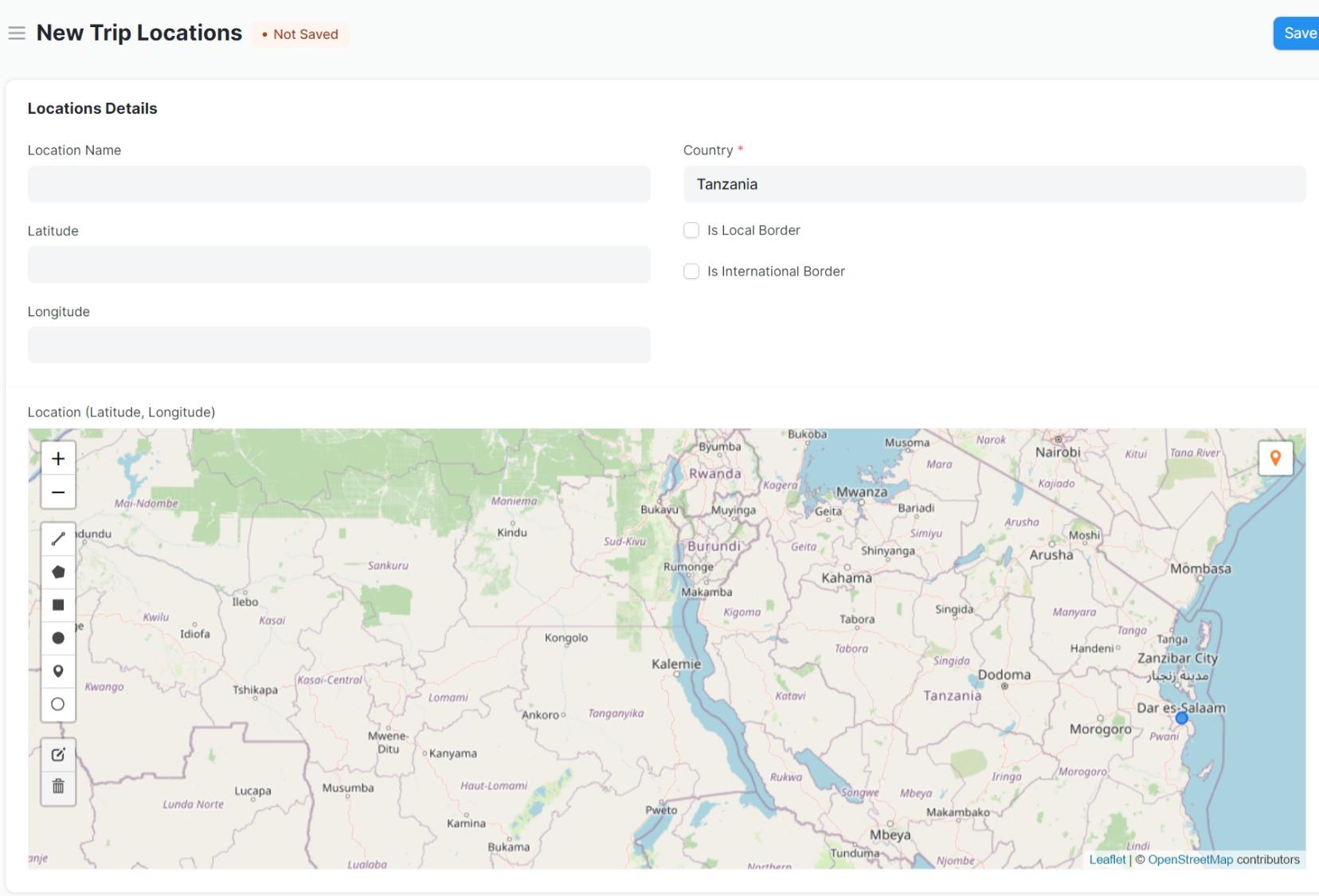
- Navigate to the "Trip Locations" doctype.
- Click on New to create a new location.
- Enter the Location Name (description) in the
descriptionfield. - Provide the Latitude and Longitude values in the respective fields.
- Select if the location is a Local Border or International Border using the corresponding checkboxes.
-
Define Parent Location:
- In the
parent_locationfield, select the parent location from the existing locations if the current location is a child location.
- In the
-
Saving the Location:
- Save the location after entering the necessary details.
- Upon saving, the system automatically calculates the area of the location based on its geographical features.
-
Viewing Location Details:
- The system will show the Location (Latitude, Longitude) as a geolocation link for easy access and verification.
-
Managing Ancestor Locations:
- If an ancestor location is modified, the system will update the corresponding features and areas for all child locations.
5. Script Customizations
The following customizations are applied in the Trip Locations doctype script:
-
Location Area Calculation:
- The
calculate_location_area()method computes the area based on geographical features and updates the location's area.
- The
-
Feature Management for Ancestors:
- When updating a location, the system will propagate changes to ancestor locations, ensuring the area and features are updated across the location hierarchy.
-
Child and Ancestor Feature Synchronization:
- The
add_child_property()method adds child-specific properties to features, and theupdate_ancestor_location_features()method ensures that changes are synchronized up the hierarchy.
- The
-
Geographical Area Calculation:
- The
compute_area()method computes the area based on the geographical features provided (e.g., polygons or circles).
- The
6. Troubleshooting (Common Errors and Resolutions)
-
Error: "Latitude and Longitude must be provided."
- Resolution: Ensure that both the
latitudeandlongitudefields are populated with valid numerical values before saving the location.
- Resolution: Ensure that both the
-
Error: "Location Name already exists."
- Resolution: The
descriptionfield is unique. Make sure that the location name does not conflict with an existing location.
- Resolution: The
-
Error: "Cannot delete location due to child locations."
- Resolution: If a location has child locations, it cannot be deleted. You must first delete or reassign the child locations before deleting the parent location.
-
Error: "Failed to calculate area."
- Resolution: Ensure that the
location_latitude_longitudefield is correctly populated with valid geographical data (GeoJSON format).
- Resolution: Ensure that the
7. User Roles and Permissions
-
System Manager:
- Can create, read, update, delete, email, export, and print Trip Locations.
- Has full access to managing the hierarchical relationships and geolocation data.
-
Clearing Agent:
- Can create, read, and write Trip Locations.
- Can view and update locations but has limited permissions for deleting or exporting data.
8. Key Notes
- Nested Set Model: The use of the Nested Set model allows for efficient querying of hierarchical data, such as finding child locations or calculating areas for parent locations.
- Area Updates: Any modification to the area of a location automatically updates the area for all ancestor locations.
- GeoJSON Format: The
location_latitude_longitudefield must follow a valid GeoJSON format for accurate mapping and area calculation.
9. What Business Process Pain Point Does It Help Remove?
- Challenge: Managing complex location data, especially when dealing with nested location hierarchies and calculating areas for geographical features.
- Solution: The Trip Locations doctype allows businesses to easily handle hierarchical location data, automate area calculations, and synchronize location features across a network of locations, significantly reducing manual effort and errors in location data management.